

Written By:
Monica Kinsey
Monica is a former warehouse operations manager with a passion for workplace safety. Her favorite topics to cover include safety leadership and continuous improvement.
Safety audits and inspections generate valuable insight, but the real impact comes from what happens next. When you rely on spreadsheets, paper checklists, or scattered files, many findings never translate into meaningful action. EHS software changes that dynamic by organizing information, streamlining follow-up, and keeping the entire process accountable from start to finish. With the right system in place, every audit and inspection becomes an opportunity to strengthen performance across the operation.
What are Safety Audits and Inspections?
Safety audits and inspections work together to uncover risks, evaluate controls, and confirm the effectiveness of safety systems. Audits take a broad look at programs, policies, and procedures to determine whether they meet regulatory and internal standards. Because of their depth, they typically occur quarterly or annually and require thorough documentation.
Inspections, on the other hand, focus on day-to-day hazards. They evaluate equipment, work areas, and behaviors to identify issues that need immediate correction. Their higher frequency makes them a critical early-warning tool for operational risks.
When teams manage both activities with software, they gain visibility into patterns and trends that are difficult to catch manually. Each finding becomes a data point that feeds long-term improvement efforts.
Why are They Important?
Audits and inspections highlight compliance gaps, unsafe work conditions, and process breakdowns before those issues escalate into incidents. They also reinforce accountability across all levels of the organization. Leaders can monitor open items, supervisors can track progress in their areas, and employees can participate in correcting issues more efficiently.
With the help of software, these processes no longer end with a static report. Instead, findings automatically convert into trackable action items, ensuring nothing slips through the cracks. Over time, this reduces incident frequency, strengthens safety culture, and lowers costs tied to injuries, downtime, fines, or repeat deficiencies.
Free Download
Download this free buyer’s guide to learn how to find the EHS software system for your company.

Effectively Conducting EHS Audits
When preparing for a safety audit, determine its scope and objectives. You might want to review previous audits to better understand prior findings and recommendations. That way, you can get even more value out of your own audit.
The key to success is proper planning. Here are some questions you can answer in anticipation of an upcoming audit to make it more valuable:
- Who will conduct the audit?
- What is the scope of the audit?
- Where will the audit take place?
- How will auditor document their findings?
- Who will assign corrective actions?
Software houses previous reports, corrective action history, and supporting documentation in one place to streamline audit preparation. Auditors can easily review past outcomes, compare program maturity over time, and structure the new audit based on what the data reveals. Once the audit begins, digital forms ensure consistent evaluation, required fields reduce missing information, and findings flow directly into the action-tracking system.
Key questions remain important but software standardizes the process so each step produces more reliable results.
Getting Value from Safety Audits
The value of an audit comes from how effectively you respond to what you uncover. Written procedures, training records, and other documentation help establish a baseline, but software allows you to measure performance trends and track improvements across multiple audit cycles.
After a safety audit, the auditor documents their findings in a digital platform and turns them into actionable tasks. Task owners receive assignments instantly, deadlines are visible to everyone involved, and leadership can monitor progress without requesting manual updates. This eliminates one of the biggest challenges in traditional auditing: follow-up.
Detailed Workplace Safety Inspections
Inspections work best when they are targeted, frequent, and consistent. You should define the purpose of each inspection, set the appropriate cadence based on risk, and use checklists aligned with regulatory expectations.
Software simplifies the inspections by automating inspection processes, storing checklists, and triggering reminders so your team doesn’t overlook anything. Inspectors can complete reports directly from a mobile device, upload photos, document hazards, and issue immediate action items when necessary. Critical findings receive priority, while lower-risk issues have later follow-up.
As soon as the inspection is submitted, the system assigns tasks, timestamps the results, and organizes them for future audits or compliance reviews. This prevents lost notes, incomplete reports, or forgotten follow-up.
[Check out some of the safety audit and inspection checklists in our EHS template library!]
Driving Improvements with EHS Software
The real power of software lies in its ability to transform findings into progress. Recurring issues become visible through dashboards and trend reports. High-risk hazards receive faster escalation. Successful controls show up in performance data, so you can replicate them across other areas of the operation.
Frontline ACT plays a central role in this process. It’s the best action tracking software for documenting safety audits and inspections, creating corrective actions, routing tasks for review, and tracking completion. Each step is standardized, transparent, and measurable. The event workflow makes it easy to tailor requirements for different audit types, add necessary approvals, and build repeatable processes that match your operational risk levels.
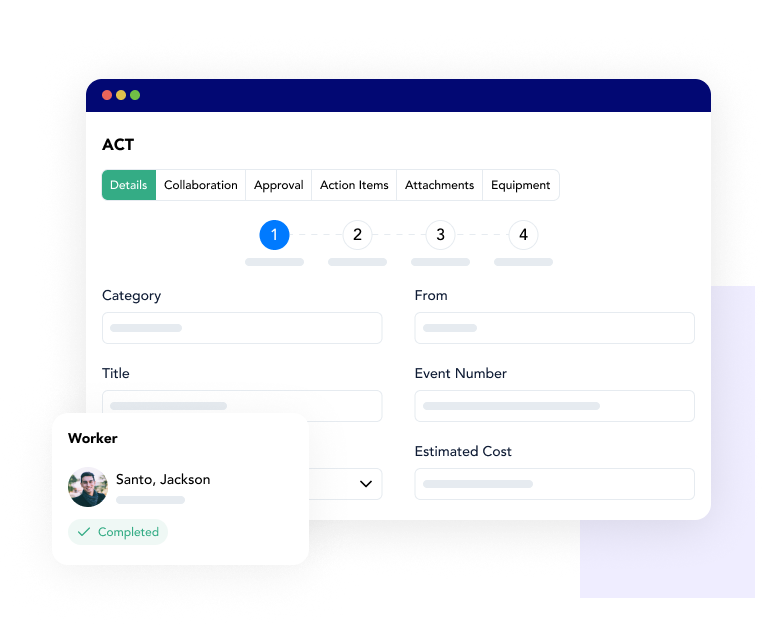
With Frontline ACT, you don’t have to rely on manual follow-up or disconnected systems. This helps build consistent, data-backed improvement cycles that strengthen both compliance and daily safety performance.
If you want to explore how Frontline ACT can streamline your audit and inspection processes, book a demo with our team. You can also access our pricing calculator to estimate the cost for your company.