

Written By:
Tiffany Gurary
Tiffany is an EHS professional with 15 years of experience supporting chemical manufacturing, research and development, pilot operations, and multi-site industrial environments.
Oil and gas companies handle regulations that other industries don’t. That’s why it’s important to use software that’s tailored to oil and gas companies.
EHS software for oil and gas proves to regulators that you’re staying compliant. Your software suite needs management of change, incident investigations and corrective actions, contractor management, permits, training and qualification, and audits.
Your software choice will depend on which rules your specific operation holds. For example, a refinery held to OSHA’s PSM standard needs different documentation than an offshore operator under BSEE. Test your shortlist to find the one with the most capabilities tailored to your niche.
My guide will go over which rules matter for each segment of oil and gas, the capabilities you need, and my top questions to ask vendors. This guide should get you to the right fit for your team.
Why Oil & Gas Need a Specialized EHS Tool
Oil and gas has three needs that a generic EHS tool isn’t going to address:
- Many oil and gas hazards have potentially high consequences, such as flammable materials under pressure and confined spaces.
- Work is spread across remote sites and relies on contractor support.
- Oil and gas operators work with several overlapping rulebooks at once.
The Bureau of Labor Statistics noted 65 fatal work injuries in oil and gas extraction in 2024, down from 78 in 2023.
Another one we don’t talk about enough is the strain of growth. If you buy a plant or a field, you inherit its paperwork, permits, and sometimes a new EHS tool. Software that’s easily adoptable for new sites is key.
Which Rules Apply to Oil & Gas?
What subsector does your company operate in? How much do you hold onsite? Use this table as a starting point, but know that it’s not all-inclusive!
| Subsector | Main rules | What your records need to show |
| Wells, field production, well servicing | General OSHA standards and recordkeeping. OSHA’s PSM standard excludes well drilling or servicing and usually unoccupied remote facilities, too. | Incidents, audits, training, contractor management, hot work and other permits |
| Gas processing, refining, terminals | OSHA PSM when a process holds 10,000 pounds or more of a flammable gas or liquid. EPA’s Risk Management Program (40 CFR 68) at its own threshold quantities. | MOC, process hazard analysis, audits, mechanical integrity, incident investigations, contractor management |
| Pipelines (gas and hazardous liquid) | PHMSA rules at 49 CFR Parts 192 and 195, including operator qualification | Covered tasks, communication for changes who’s qualified for each task, evaluation records |
| Offshore and federal waters | BSEE’s SEMS rule, 30 CFR 250 Subpart S: 13 elements | A SEMS audit by an accredited provider within 2 years of implementation and every 3 years after |
Under the RMP rule, crude oil, field gas, condensate, and produced water are not counted toward threshold quantities until they enter a gas or refinery processing unit.
Plans and exemptions all vary, and rules change. EPA proposed amendments to the RMP rule in February 2026, so keep an eye out for changes.
8 EHS Software Capabilities You Need in Oil & Gas
I’ve given you questions to ask vendors in your demos that help you stay compliant. These are 8 big factors that help oil and gas particularly.
| Feature | Related regulations | What to test in a demo |
| 1. Management of change | 29 CFR 1910.119(l); SEMS | Show that you can manage the change, approvals, and block closeout until team updates procedures and training. Can you train everybody affected before startup? |
| 2. Corrective action tracking | 1910.119(e)(5), (m)(5), (o)(4) | Do incident, audit, and hazard analysis recommendations consolidate in an action list with deadlines and owners? Is each response documented? |
| 3. Incident investigation | 1910.119(m) | Can an investigation start within 48 hours and produce a report with dates, description, contributing factors, and recommendations? |
| 4. Mechanical integrity records | 1910.119(j)(4)-(5) | Records need the date, inspector, equipment identifier, description, and results. Are missing records tracked so they can be corrected? |
| 5. Training and qualification | 1910.119(g); 49 CFR 192.805 and 195.505 | PSM refresher training is at minimum every three years. Can you identify anyone who is not qualified? |
| 6. Contractor control | 1910.119(h) | Is there a pre-qualification record and a site check? |
| 7. Permits and hot work | 1910.119(k); 1910.252(a) | Can permits expire and link to a change or job? |
| 8. Audits and hazard analysis revalidation | 1910.119(e)(6), (o); 30 CFR 250.1920 | Are findings documented, and are the two most recent audit reports kept on file? |
The Most Important Factor: MOC End to End
Say a crew replaces a pump with a model that has a new seal design. That needs management of change.
A good MOC system walks the requester through the five considerations in 1910.119(l)(2) (technical reason, safety and health impact, changes to procedures, the time period the change will last, who authorizes it) and then creates tasks to update process safety and ops. Your EHS should be able to assign training for everyone affected before startup. The change closes only when the tasks close.
8 Questions to Ask EHS Vendors
I’ve bought EHS software for my team before. Now that I work at Frontline, I’ve seen both sides of the selection process. Here’s what I’d recommend you ask the vendors when they’re demoing EHS software:
- Can you show me how a corrective action gets assigned, escalated, and closed?
- I manage multiple sites. Can I see rolled-up compliance status across all of them, right now, in this call?
- What happens automatically when an item is 30 days from expiring? What happens if it’s ignored?
- Can I bring one of our actual audit forms and configure it into the system on this call?
- Do we pay for the full suite, or can we start with the module we actually need and add on later?
- Walk me through implementation. Who handles data migration, and what’s our go-live date?
- Can a technician complete this from a phone on the floor?
- What does a management-of-change request look like moving through every required approval step?
How to Run the EHS Evaluation
There are 4 steps to choosing the right software.
- Chart your rules. List the rulebooks that apply to each of your sites using the table above. Mark your top three or four capabilities that are nonnegotiables.
- Write three scenarios from your ops. See if you can walk through everyday scenarios in the software like closing out incident reports.
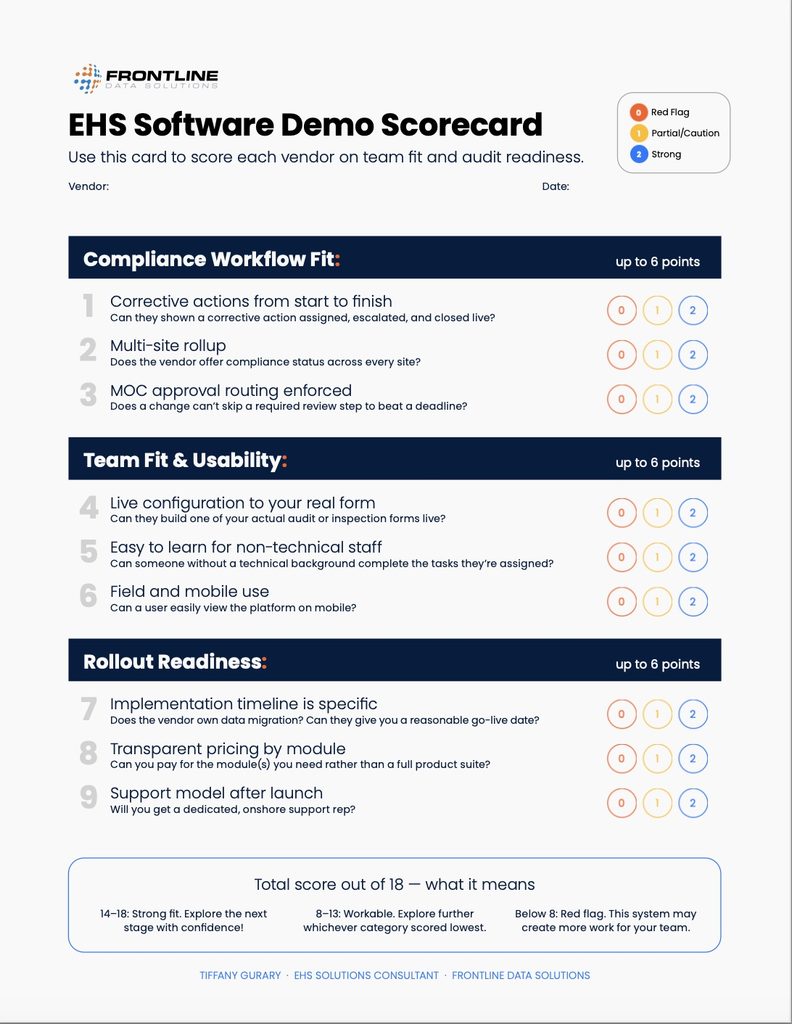
- Run every vendor through the same scenarios. Score them on the same scorecard, and have the people who will use the tool weigh in.
- Check references in your segment. Ask what the first 90 days looked like, how historical records moved over, and what they would do differently.
I made an EHS scorecard that maps all the necessary criteria out for EHS software as you’re working through demos:
Where Frontline fits
Frontline has four modules that line up with the essentials that oil and gas companies need: MOC for management of change, ACT for incidents and corrective actions, LMS for training, and CSM for contractor safety.
Oil and gas operators use Frontline across upstream, midstream, and refining operations. You can start with one module and add others as your program grows.
See why oil and gas operators love Frontline: Read a success story from our customer NCTI.